1. Introduction
1.1. Summary of components
The TIMES model environment under VEDA is depicted in Fig. 1.1. For ANSWER the underlying model management flow is very similar, with the addition of a <Case>.ANT file being dumped by the TIMES GAMS report writer for importing of the model results into ANSWER, if desired, though model TIMES users tend to rely on the extra power brought to bear by VEDA-BE.
It is composed of five distinct components described below.
The TIMES Model Generator (as well as MARKAL[1]) comprises the GAMS source code that processes each dataset (the model) and generates a matrix with all the coefficients that specify the economic equilibrium model of the energy system as a mathematical programming problem. The model generator also post-processes the optimization to prepare results that are suitable to be read by the model management systems (and other tools). It is shown in Fig. 1.1 labelled as TIMES. The TIMES model generator is available from ETSAP under an open source license[2].
The model is a set of data files (spreadsheets, databases, simple ASCII files), which fully describes an energy system (technologies, commodities, resources, and demands for energy services) in a format compatible with an associated model management shell. Each set of files comprises one model (perhaps consisting of a number of regional models) and is “owned” by the developer(s). It is shown in Fig. 1.1 as the Data and Assumptions box in the upper left. Instances of global models include the IEA’s Energy Technology Perspectives (ETP[3]), the TIMES Integrated Assessment Models (TIAM[4]), and that of the European Fusion Development Agreement (EFDA[5]). Large multi-region models exist in the form of Pan-European TIMES models (JRC-EU-TIMES[6] and PET[7]) covering all EU member states (+ Norway, Switzerland and Iceland in the PET model), and the Framework for Analysis of Climate-Energy-Technology Systems (FACETS[8]) for the US. Finally, there are numerous national, regional, and municipal models developed by the ETSAP Partner institutions and other institutions.[9]^,^[10]
A Model Management “shell” is a user interface that oversees all aspects of working with a model, including handling the input data, invoking the Model Generator, and examining the results. It is shown in Fig. 1.1 labelled VEDA-FE and VEDA-BE for the parts handling the input data and model results respectively. It thereby makes practical the use of robust models (theoretically, simple models can be handled by means of ASCII file editors, if desired). The first shell, MUSS, was developed in 1990 by DecisionWare Inc. for use with MARKAL (and is no longer available). Two shells currently in use for TIMES are ANSWER, originally developed by ABARE and subsequently the property of Noble-Soft Systems Pty Ltd[11], and VEDA, developed by KanORS-EMR. Both ANSWER and VEDA handle MARKAL as well as TIMES. Both shells were partly developed using ETSAP resources, along with substantial contributions of the developers and other projects employing the systems. Note that as shown in Fig. 1.1, VEDA-FE interacts with GAMS by means of the *.RUN/DD files and GAMS interacts with VEDA-BE by processing the GDX file to produce the run VD* files. VEDA-BE can write to XLS or other file types. See Sections IV and V for a description of VEDA, and the separate ANSWER documentation respectively.
The General Algebraic Modeling System (GAMS)[12] is the computer programming language in which the MARKAL and TIMES Model Generators are written. GAMS is a two-pass language (first compiling the input data and source code, then executing for the data provided) designed explicitly to facilitate the formulation of complex mathematically programming models. GAMS integrates smoothly with various solvers to generate the mathematic programming problem and seamlessly pass it to the solvers for optimization, then post-process the optimization to produce the TIMES results report for the “shells.” It is shown in Fig. 1.1 GAMS together with the final component, Solvers. During a run, GAMS produces a LST file with an echo of the model run steps and solution. The LOG file in the figure is actually produced by TIMES, listing the quality assurance checks. GAMS is the property of GAMS Development Corporation, Washington D.C. Information on GAMS may be found at www.gams.com. More specific GAMS - ETSAP information can be obtained from the ETSAP Liaison Officer, Gary Goldstein.
A solver is a software package integrated with GAMS which solves the mathematical programming problem produced by the Model Generator for a particular instance of the TIMES model. Solvers are discussed further in Section 1.4. More information on solvers may be found at www.gams.com.

Fig. 1.1 Components of the TIMES Modeling Platform Under VEDA.
The rest of this Part describes in more detail how the computer environment is organized and operates to make working with TIMES viable and effective.
1.2. Minimum computer requirements
The minimum basic software requirements consist of the GAMS modeling language and an associated solver, a model management “shell” (which while technically optional has been used for every application of TIMES to date) comprised of either VEDA (Front-End (FE) for handling input data and Back-End (BE) for processing results) or ANSWER (where ANSWER users often also employ VEDA-BE for results). The “shells” are Windows based Visual-Basic turnkey applications that are distributed as part of a TIMES installation package, see Parts IV and V for VEDA and the separate ANSWER documentation for a discussion on the model management systems.
In terms of the Windows operating system, any version (32 or 64 bit) from Version 7 on is supported by both ANSWER and VEDA. Both ANSWER and VEDA require that a properly licensed version of Microsoft Excel be installed on the computer. Both shells may be run on Apple computers within a Windows emulator; however, they are not supported on Linux/Unix platforms.
For hardware, a “high-end” personal computer with a minimum of 8GB RAM (16GB or more for larger models), ideally a multi-core/CPU processor (dual quad core for large models), and up to 250GB (depending upon the size of the model and studies to be undertaken) of hard disk storage for the modeling is recommended.
1.3. General layout of the software
Each of the components mentioned above – GAMS, VEDA, and ANSWER – reside in their own Windows folder of the ROOT on whatever drive the user wishes. When installing the software, the user is strongly encouraged to follow this “install in the root” recommendation, as the complex nature of the software systems and their interdependencies are most smoothly handled when the system is setup in this manner (rather than installing under Program Files for example).
The various components discussed above “talk” with each other primarily by means of ASCII text files deposited in common locations (folders) and passed between said components. The specific folder layout for each component is discussed below and later in the Section a look at the specific files involved with the inter-component communication is provided. This handshaking is virtually seamless from the users’ perspective, as long as all the component paths are properly identified for each component.
For GAMS, the system is self-contained in a \GAMS\<os>\<version> system folder (if installed in the default location, as recommended) and is connected to VEDA-FE and ANSWER through the Windows Path Environment Variable. This GAMS path is either set during installation automatically (by requesting Advanced Installation Mode and requesting Add GAMS Directory to Path Environment Variable) or manually via the Windows Control Panel. Full (simple) instructions are provided for installing and properly configuring GAMS for use with TIMES with the software distribution notification email and are summarized in Section 1.4 below.
For ANSWER, the core of the system must reside in a single folder \AnswerTIMESv6 (encouraged to be right off the root). A full description of the folder structure that ANSWER employs may be found in the separate ANSWER documentation, with the basic layout shown in Figure 2 below. From the perspective of connecting ANSWER with GAMS and VEDA-BE (if used) the key subfolders the user needs to be aware of are the GAMS_SrcTI and GAMS_WrkTI default TIMES source code and model run folders respectively. Upon initiating a model run, ANSWER needs to inform GAMS where the TIMES model source code is, that being GAMS_SrcTI (or any variant the user chooses to setup). For the model results to find their way to VEDA-BE, it must be informed of the model run folder, that being GAMS_WrkTI (or any variant the user chooses to set up, say for different projects), through the VEDA-BE Import Results/Manage Input File Location operation. The location of these folders for each model is set within ANSWER, through the Tools/File Locations option. (In the example shown in Figure 2, several GAMS_Wrk<model> folders have been created so that different models (or projects) are run in distinct folders.)The other folder the user will interact with is the Answer_Databases where by default the user’s ANSWER TIMES database (MDB) and usually Excel input templates would reside. In this regard the user is encouraged to make subfolders under Answer_Databases (or any other location they wish) for each of their models or project, as shown in Fig. 1.2.

Fig. 1.2 Layout of the ANSWER Folders
For VEDA, the core of the system must reside in a single folder \VEDA (encouraged to be right off the root), with the basic required folder structure shown in Fig. 1.3. From the perspective of connecting VEDA-FE with GAMS, the key subfolders the user needs to be particularly aware of are the GAMS_SrcTIMESv### and GAMS_WrkTIMES (or other run folders for each project if desired), the default TIMES source code and model run folders respectively. Both reside in the \VEDA\VEDA_FE folder. Upon initiating a model run, VEDA-FE needs to inform GAMS where the TIMES model source code is, that being GAMS_SrcTIMES### (or any variant the user chooses to setup). For the model results to find their way to VEDA-BE it must be informed of the model run folder, that being GAMS_WrkTIMES (or any variant the user chooses to set up, say for different projects or model instances), through the VEDA-BE Import Results/Manage Input File Location operation. The location of these folders for each model is set within VEDA-FE, through Tools/User Options settings.
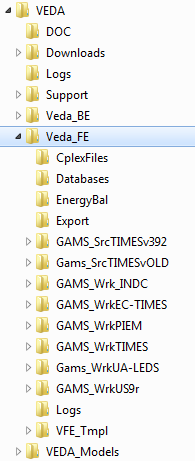
Fig. 1.3 Layout of the VEDA-FE Folders
To complete the inter-connection picture between components of VEDA, VEDA-FE maintains each model instance in the VEDA_Models folder where the user assembles the model input Excel templates. The other folder the user will need to be aware of is the VEDA_BE\Databases\<project> where the user’s the VEDA-BE results databases reside. In order for VEDA-FE to use Sets defined in VEDA-BE for user constraint and/or scenario specifications, the former must be pointed to the latter – by means of clicking on the VEDA-BE database reference up at the top of the VEDA-FE application window.
1.4. Software installation
This section provides an overview of the installation process for GAMS, which is required for all TIMES installations[13]
GAMS employs “soft” licensing. That is, each system is licensed for a certain Windows PC or Server or Linux and requested solvers to a particular institution for a requested number of users. The license is not to be shared outside the authorized institution and the number of users is to be adhered to – all based upon trust (and the very active GAMS and MARKAL/TIMES user community).
Note that GAMS provides two kinds of licenses for working with TIMES, the conventional license which provides the user with the actual TIMES GAMS source code, and a Runtime license where the source code is precompiled and therefore may not be changed. The Runtime license ONLY permits GAMS to be used in conjunction with TIMES. That is, no other GAMS models may be run using a ETSAP TIMES Runtime license. The Runtime license is sold at half the price of a corresponding full license. To obtain GAMS for use with MARKAL/TIMES contact the ETSAP Liaison Officer, Gary Goldstein.
The basic procedure for installing GAMS is:
Copy your GAMS license file, GAMSLICE.txt, provided as part of the licensing process by the Liaison Officer, someplace on your computer.
Head to http://www.gams.com/download/ and select the Windows download option for either Win-64/32, as appropriate.
Run Setup by clicking on it in Windows Explorer
a. Check “Use advanced installation mode” at the bottom of the GAMS Setup form.
b. Let GAMS get installed into the default folder (\GAMS\<Win#>\<ver>).
c. Check the Add GAMS directory to PATH environment variable.
d. Have the GAMSLICE.TXT copied from wherever it currently resides.
If you are using a non-default solver (e.g., CPLEX is the default for LP and MIP models and CONOPT for NLP) then there is one further step that must be carried out to complete the setup procedure:
If using a non-default solver, upon completion use Windows Explorer to go to the GAMS system folder and run the GAMSINST program to set the default solver for each type to the solvers supported by your license GAMSLICE file by entering the associated number in the list and hitting return or just hitting return (if your solver is the default or not listed).
Which solver to use is a function of the TIMES model variant to be solved and the solver(s) purchased by the user with GAMS. Basically the solvers used for TIMES fall into three categories, linear (LP), mixed integer (MIP) and non-linear (NLP), where Table 1.1 provides a partial list of the GAMS solvers generally used with TIMES for each main model variant. For a complete list of the solvers available refer to the GAMS website. The various Model Instances mentioned in the table are discussed further in Section 3.6, as well as in Part I and Part II.
Model Instance |
Nature of Model |
Viable Solvers |
|---|---|---|
Basic TIMES (including Elastic Demand, Climate, Stochastic, etc.) |
Linear (LP) |
For full-blown TIMES models power solvers are recommended (CPLEX/XPRESS/GUROBI). For modest size models MINOS or the “free” public solvers may suffice |
Discrete Investment, Discrete Retirement, Discrete Dispatching and Endogenous Technology Learning Extensions |
Mixed Integer (MIP) |
Power solvers are recommended (CPLEX/XPRESS/GUROBI). For modest size models the “free” public CBC solvers may suffice |
MACRO (integrated or MSA/CSA), Micro (NLP option), Damage (NLP option) |
Non-linear (NLP) |
CONOPT recommended, MINOS an option (but no longer being developed) |
1.5. Organization of Part III
Section 2 lays out more specifically how the various components of the TIMES modeling platform interact and accomplish their tasks. Following an overview of the run process, the routines comprising the TIMES source code are described, discussing how they guide the model through compilation, execution, solve, and reporting. Section 2.3 then describes the various files produced by the run process and their use. Finally, Section 2.4 discusses identifying and resolving errors that may occur during the run process. Section 3 then details the various switches that control the execution of the TIMES code.